How to Hire an AI Video Creator for Your Brand (2026 Checklist)
If I were hiring an AI video creator in 2026, I’d look at five things first: past ad work, finishing quality, platform fit, turnaround time, and usage rights. That’s the short version.
Here’s the simple truth: AI tools can make clips, but they do not turn those clips into ad-ready videos on their own. If I want work that looks on-brand and is ready for Meta, TikTok, Reels, Shorts, or product pages, I need someone who can handle the whole job - script, shot planning, generation, edit, sound, captions, and exports.
The article boils the hiring process down to a few clear checks:
- Look past the reel. I’d ask if the work has run as paid media, not just sat in a portfolio.
- Check the finish. Raw AI footage often needs editing, color work, sound, pacing, subtitle cleanup, and format exports.
- Ask about performance. A nice-looking video is not enough. I’d want to hear how they think about hooks, CTR, testing, and ROAS.
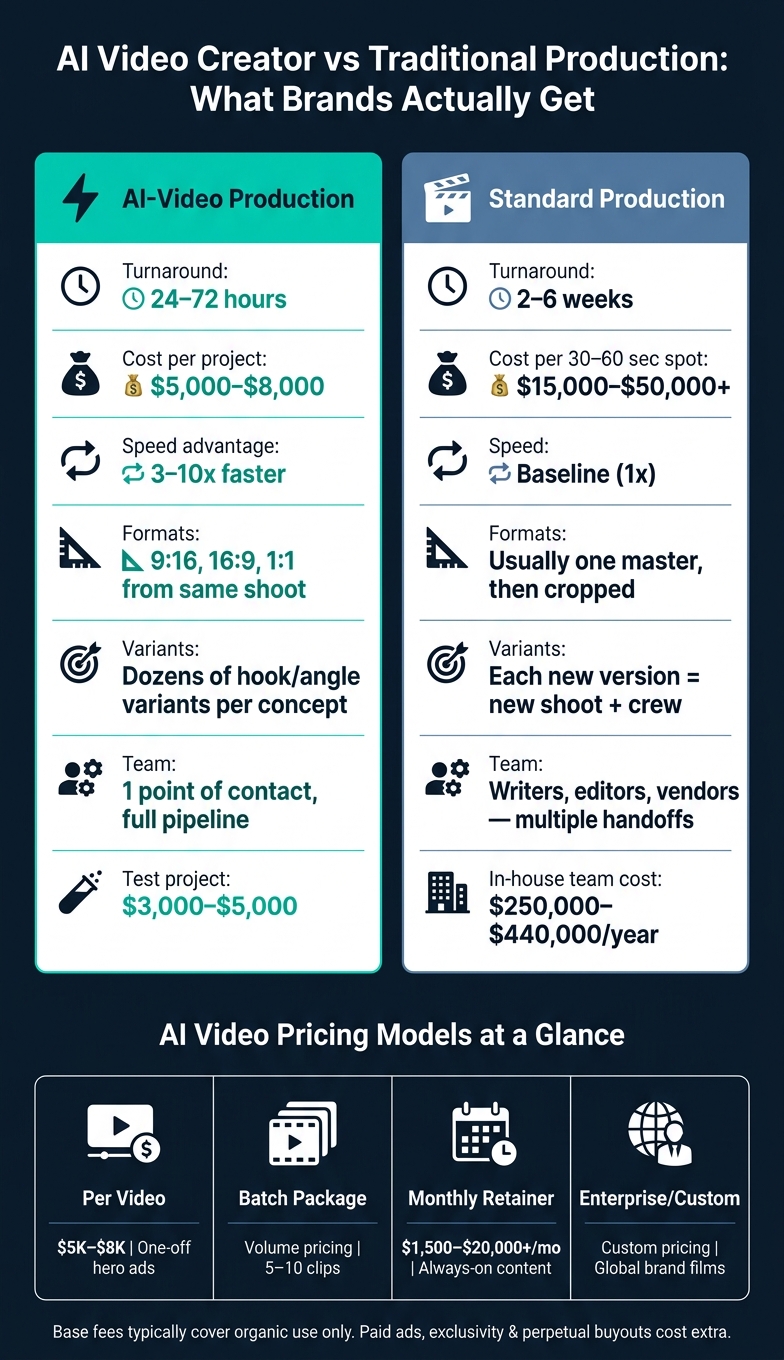
- Review speed and scope. AI-first workflows can deliver a first cut in 24–72 hours, while older production often takes 2–6 weeks.
- Compare cost the right way. The article puts pro AI video at about $5,000–$8,000 for a quality project, versus $15,000–$50,000+ for a standard 30–60 second spot.
- Start with a paid test. A small trial in the $3,000–$5,000 range can show how the person works before I commit to more.
- Read the contract. I’d confirm ad usage, buyout terms, and any model-training language before signing.
Quick Comparison
| Option | Best for | Brand time needed | Main risk |
|---|---|---|---|
| AI video software | Internal content, low-stakes social posts | High | Output looks off-brand or unfinished |
| AI video creator | Ads, product videos, brand campaigns | Low | Hiring someone who only prompts and doesn’t finish |
The piece also covers warning signs I would not ignore: character drift, weak voice sync, random-looking edits, vague revision terms, and promises that sound too good to be true.
If I had to sum it up in one line, it would be this: hire for finished output, not tool access.
sbb-itb-f51e864
Why Brands Hire an AI Video Creator Instead of Building In-House
AI Video Creator vs Traditional Production: Cost, Speed & Scale (2026)
Once you get past the software itself, the bigger call is simple: build a team or bring in a specialist. On paper, in-house can look like the cheaper move. In practice, fixed costs stack up fast. A two-person team - one producer and one editor - can cost $250,000 to $440,000 per year when you include salaries, equipment, and overhead.
Faster Output, More Test Angles, Less Production Friction
Speed is the big draw. AI-first production is usually 3 to 10 times faster than older production workflows. A polished 15–30 second first cut can hit your inbox in 24–72 hours. With standard production, that same timeline is often 2–6 weeks.
That time gap matters, especially in paid social. Standard production tends to scale in a straight line: more versions mean more shoots, more crew days, and more budget. AI production works differently. One concept can turn into dozens of hook and angle variants across formats without matching cost increases.
For brands running Meta or TikTok campaigns, that gives you a much bigger testing surface. And that can be the difference between finding a winning ad fast and burning budget on one piece of creative.
One Point of Contact Who Owns the Full Pipeline
A strong AI video creator handles the full pipeline, from script to final delivery. That means fewer handoff delays, fewer moving parts, and a smoother path from idea to finished asset.
It also helps keep quality steady. Instead of bouncing between writers, editors, and outside vendors, you have one person who sees the whole job through.
Why US-Based Support Matters for US-Focused Brands
For U.S. brands, speed only helps if revisions are easy to push through. Native U.S. English and time zone overlap help keep feedback moving without the usual lag.
That also shows up in the details that can make or break a campaign:
- Native-sounding voiceovers
- Accurate subtitles
- Policy-safe edits
Those points matter more than they seem, especially when ads need to sound natural and stay compliant on platforms like Meta and TikTok.
Looking to hire? Send your brief now - reply usually within a day.
What to Look For Before You Hire an AI Video Creator
Judge creators on three things: proof in the portfolio, finishing skill, and fit for performance. A reel should show brand-ready work for paid campaigns, not just a batch of AI clips. That’s the line between someone who can run the job and someone who can only write prompts.
Portfolio Signals That Show Real Brand-Ad Experience
Start with the reel. Look at direction, craft, and consistency. Does the work feel polished and intentional from shot to shot? Or does it feel like a random sequence of clips stitched together? One of the clearest warning signs is character drift across shots, which often points to weak AI output.
Scale matters too. Look for signals like 36+ brands, 500+ videos, and around a 72-hour average turnaround. Then check range. A strong portfolio should show more than one lane, including:
- Short-form social clips
- Brand commercials
- Explainers
If every piece looks like the same format with a new logo slapped on it, that tells you a lot.
If the reel holds up, move to the next filter: can this person finish the work to ad-ready standards?
Finishing Skills That Make AI Output Look Shot on Camera
Finishing is what turns rough AI output into something you can actually run as an ad. The difference between a usable campaign asset and an unfinished video usually comes down to what happens after generation: color, edit pace, sound, voiceover sync, captions, and delivery in 9:16, 16:9, and 1:1.
A simple test works well here: ask for a before-and-after. Raw output next to the final ad.
That gap tells you a lot. You can see how much polish went into the piece and whether the creator has the post-production skill your brand needs, not just the ability to get AI to spit out footage.
Once the work looks finished, check whether it was built to perform, not just to look nice in a reel.
Performance Focus and Platform Fit
A good-looking video that doesn’t convert misses the brief. Meta and TikTok need different hooks, pacing, and CTAs for brand ads. So don’t stop at visual taste. Ask how they think about CTR and ROAS.
Can they explain why they chose a certain hook? Can they talk through angle testing? If not, they’re selling production, not performance.
That’s where the next part comes in: asking the right questions before you sign.
The Hiring Checklist: Questions, Pricing, and Red Flags
Questions to Ask Before You Sign
Use the call to check the parts a reel can't show. A slick montage can look great, but it won't tell you much about process, judgment, or whether the team can move fast without putting your brand at risk. The discovery call is where you separate a production partner from someone who just knows how to write prompts.
Ask them to walk through the full process, from brief to final delivery. Find out who handles scripting and creative direction. You’re trying to confirm they can ship brand-safe ads at campaign speed, not just generate clips.
"The 'AI' part is the smallest part... What you're paying a production company for is everything around the generation: creative development, visual consistency, brand safety, and post-production."
Then get specific. Ask how they keep characters, products, and environments consistent across multiple shots. That’s their consistency workflow. Ask for a delivery timeline based on asset length and revision scope. Also pin down what a revision means. Is it one shot? A scene swap? A full re-cut?
You should also ask whether they can deliver 9:16, 16:9, and 1:1 from the same shot list, instead of just cropping from one master. And ask if they can supply hook variations for A/B testing.
Once you understand the workflow, you can compare price against the actual scope and usage.
Pricing Models and What Affects the Cost
Price should follow scope, not runtime. A short ad can cost more than a longer explainer if it needs more characters, more versions, or heavier finishing work. The biggest cost drivers are script complexity, number of characters and locations, revision rounds, voiceover, localization, aspect-ratio versions, and how much post-production polish is involved.
For a sense of scale, traditional production for a 30–60 second spot usually lands around $15,000–$50,000+, while professional AI production at a similar quality level starts at about $5,000–$8,000. Monthly retainers run from $1,500–$4,000 on the lower end to $10,000–$20,000+ for premium volume. In most cases, base fees cover organic use only. Paid ads, exclusivity, and perpetual buyouts usually cost extra.
| Pricing Model | Typical Use Case | What's Usually Included | Best Fit | Main Tradeoff |
|---|---|---|---|---|
| Per Video / Project | One-off hero ads or product launches | Script, generation, 2 revision rounds, final delivery | Brands with specific, infrequent needs | Higher cost per deliverable than retainers |
| Batch Package | Social campaigns (5–10 clips) | Multiple aspect ratios, shared assets across clips | Performance marketers needing high volume | Less creative depth per individual clip |
| Monthly Retainer | Always-on social content | Set number of videos/month, tool costs absorbed | Brands with steady, ongoing demand | Requires long-term budget commitment |
| Enterprise / Custom | Global brand films, high-stakes hero content | Custom-trained models, full VFX integration | Large brands with complex requirements | Longest timelines and highest cost |
Before you sign, start with one test project. A small paid trial, usually in the $3,000–$5,000 range, gives you a clean way to judge communication, taste, and how closely the team follows your brand guidelines.
Red Flags That Point to Low-Quality AI Output
Visual quality: The clearest warning sign is character drift. If faces, outfits, or body proportions change from shot to shot, that usually means the creator hasn’t solved consistency at a technical level. Also watch for footage packed with artifacts, raw AI generations with no finishing pass, and random prompt-by-prompt edits that feel stitched together instead of directed.
Take a hard look at the portfolio too. Has the work actually run as paid media? Or is it mostly spec work and flashy reels that look cool but never had to perform in the wild? That difference matters.
Process opacity: Be careful with anyone who promises a full commercial in 24 hours, throws out "unlimited revisions" without saying what counts as a revision, or refuses to name the tools they use.
Rights risk: Check the contract line by line. You want full commercial usage rights, and you want any training carve-outs spelled out in writing.
Once the price and risks are clear, define the engagement process.
What a Good Engagement Looks Like and How to Get Started
A Clear Project Process from Brief to Final Delivery
Once the scope is locked, the best creators keep the process simple and gated. The sequence should be tight: brief, approve, review, deliver.
| Stage | Creator Responsibility | Brand Responsibility | Typical Timeline |
|---|---|---|---|
| Intake & Strategy | Review brief & suggest creative hook | Provide brand assets, goals, & source docs | Day 1 |
| Script & Pre-Vis | Write script & generate pre-vis frames | Review and approve script & visual style | Day 2 |
| Generation | Prompting, scene generation, & consistency checks | N/A | Day 3–4 |
| Edit & Finish | Color grading, sound design, & captions | Review rough cut & provide feedback | Day 5–6 |
| Delivery | Export all formats & organized files | Final approval & payment | Day 7 |
Set approval gates at the script, pre-vis, rough cut, and final polish stages. That keeps surprises to a minimum and gives both sides a clean way to sign off before the next step.
Final handoff should include captioned and no-text versions, organized file names, and every required aspect ratio - not just a cropped horizontal master.
A clear process is one of the easiest ways to spot whether a creator can deliver brand-safe work.
How Elizaveta Tskhovrebova Meets This Checklist
Here’s what that looks like in practice.
Elizaveta Tskhovrebova handles the full pipeline on every project: concept, script, AI generation, editing, color, sound, and multi-format delivery. The work covers UGC ads, commercials, explainers, brand films, and short-form Reels, TikTok, and Shorts.
AI is treated like a camera. Each frame is directed for lighting, lens choice, pacing, and sound. That hands-on, director-led approach is what helps the final video feel ready for ads, not rough or half-finished.
The Shortest Path to Hiring Well
When you're sizing up a creator, focus on five things: brand proof, finishing, performance fit, turnaround, and full-pipeline ownership. Those five points tell you a lot, fast.
A smart way to start is with one test project, usually a 30–60 second video, before moving into a bigger engagement. It’s the fastest way to check process, communication, and taste.
Looking to hire? Send your brief now - reply usually within a day.
FAQs
How do I know if an AI video creator can make ads, not just clips?
Look at their portfolio of shipped client work, not just raw AI clips. Ask for a case study that shows the original brief, the versions they threw out, and the final cut.
That tells you a lot. A pro can keep products and characters consistent from shot to shot, then handle the full finish: sound design, color grading, and formatting for each platform. That’s what turns AI output into something ad-ready.
What should I ask in a paid test project before hiring?
Use a paid test project to check technical skill, communication, and reliability.
Ask them to walk you through their full process, from brief to delivery. You want to see how they think, not just what they ship. Have them explain why they picked certain AI models, and ask for a before-and-after example that shows the raw output next to the final deliverable.
Also get the revision policy in writing. That should spell out how many rounds are included and what, exactly, counts as a revision. This can save you a lot of back-and-forth later.
One more thing: ask what they would change in your test brief. That small prompt can tell you a lot. It shows whether they bring real creative input or just follow instructions word for word.
What rights should I confirm before signing a contract?
Get written confirmation on intellectual property, licensing, and model training rights for every asset you receive. Be clear on who owns the final files and the raw footage so you don’t get hit with extra fees or legal limits later.
Also pin down your rights for paid media, the provider’s enterprise-tier model licenses, exactly which deliverables are included, and whether any stock licenses allow the commercial use you have in mind.
Need video like this for your brand?
UGC, commercials, explainers and cinematic — directed with AI, finished like a studio.
Start a project →