Why Most AI Video Ads Look Cheap (and How to Make Yours Look Premium)
Most AI video ads look cheap because teams stop at generation. Premium-looking ads come from direction, shot selection, editing, color work, and sound.
I’d sum it up like this: if you type one prompt, export the first clip, and run it as an ad, it will probably look fake. That matters because 68% of marketing teams use AI in video workflows, but only 12% of viewers rate AI-generated marketing videos as high quality. And 71% of social media users say they may unfollow brands that post cheap-looking AI content.
If I wanted AI video to look more polished, I’d focus on five things right away:
- Direct each shot before generating
- Keep shots short: about 3–5 seconds
- Use image-to-video for steadier product shots
- Cut hard and reject most clips
- Finish with one color pass and layered sound
Here’s the short version:
| Problem | What I’d do instead |
|---|---|
| Flat lighting and stock-looking frames | Specify lens, light source, framing, and camera move |
| Strange faces and floaty motion | Keep actions simple and trim clips before drift shows |
| Shot-to-shot inconsistency | Use one visual plan and one color pass across the edit |
| Empty, cheap feel | Add voiceover, room tone, and foley |
| Weak final ad | Treat AI as one step in a full post workflow |
The main point is simple: AI is not the ad team. It is one tool in the process. When I treat it like a camera instead of a magic button, the output looks much better.
Why most AI video ads look cheap
Flat light, weak depth, and generic frames
Most cheap-looking AI ads start with the prompt.
When the prompt is vague, the model plays it safe. You usually get centered subjects, flat light, and backgrounds that feel like stock footage. That’s the look that instantly signals “AI-made.”
The fix is simple: be specific. Call out the lighting style, the lens feel, and the camera movement. Ask for high-contrast lighting, background blur, tighter subject focus, or a defined camera move. If you don’t, the model often falls back to flat, evenly lit frames that feel pulled from a template.
More detailed prompts tend to lead to more polished results.
Generic framing is only the first tell. Faces and motion usually give it away even faster.
Eyes that don't track naturally, and motion that feels weightless
A clip can look sharp at first glance and still feel off.
People notice strange motion fast. Research shows the human visual system can detect artificial motion artifacts within 200 milliseconds. And the tells are hard to miss once you know what to look for: waxy or poreless skin, eyes that don’t track in a natural way, missing micro-expressions, and movement that seems to float instead of carrying body weight.
That last point matters a lot. AI motion often misses the small weight shifts and uneven movement that come with real human motion. In a brand ad, even a slight mismatch can hurt trust. 71% of social media users say they will unfollow brands that post cheap-looking AI content.
Even if the face work looks decent, the edit can still give the whole thing away.
Bad pacing, flat sound, and no finishing
This is where a lot of ads fall apart.
You can have decent clips, but if they’re dumped onto a timeline with awkward pacing, the result feels unfinished. Cuts miss the beat. Color shifts from shot to shot because each clip was generated on its own. Instead of feeling like a polished ad, it starts to look like a demo reel.
Sound makes the problem worse. Generic music with no ambient sound, no product audio, and no texture leaves the ad feeling empty. Audio accounts for 50% or more of a video's perceived quality, yet it’s still the part many brands skip.
So the cheap look usually isn’t caused by the model alone. It comes from weak direction, rough editing, uneven color, and thin sound all stacking up at once.
That’s why direction, edit, grade, and sound need to work as one pipeline.
sbb-itb-f51e864
How to make AI video look premium
Direction first: treat AI like a camera, not a button
AI is a camera, not a button. That mindset changes the whole result.
If you want AI video that doesn’t look AI-made, direct it like a real shoot. Break each ad into short 3–5 second shots. Give each shot one subject, one action, one move, and one light source that makes sense in the scene.
Then get specific. Don’t just say “cinematic product shot.” Say what the shot is: 85mm portrait, soft window light from camera left, slow dolly in. That level of direction gives the model something concrete to work from. Vague prompts tend to lead to flat, generic output. Specific prompts are far more likely to give you clips you can use. Shorter shots also help cut down on product drift.
Once the shots are directed, the next step is what gives the ad polish: light, pace, color, and sound.
Use lighting, pacing, color, and sound to add production value
Each one fixes a common reason AI ads feel cheap.
- Lighting: Add contrast. A shadow side, a rim light, or one motivated source can make the frame feel deeper and less flat.
- Pacing: Small speed changes add rhythm and weight to motion that can otherwise feel floaty. Cuts should hit the beat of the music or the natural pause in the voiceover, not just the point where the clip runs out.
- Color: AI clips are made one by one, so exposure and color temperature often shift between shots. One consistent color grade across the timeline keeps the ad from feeling patched together. That’s why 73% of post-production professionals rate color grading as the single highest-impact quality improvement for AI footage.
- Sound: Layered audio helps the visuals feel grounded. A voiceover, room tone, and one or two clean foley sounds go a long way.
These choices matter most after the edit, when separate clips need to feel like one ad.
Fix the ad in post, not only in the prompt
Good raw clips are only the start. The usable ones still need to be trimmed, color-matched, and edited with pacing in mind.
Sometimes the fix is simple: cut the last half-second before the motion starts to drift. That small change can clean up the final result fast. After the edit, apply one color grade across every shot so the visual tone stays steady. Then build out the audio mix with voice, ambience, and effects so the sound feels like it belongs to the same piece.
Direction shapes the raw clips. Post-production is what makes them feel premium.
The next step is the full pipeline: prompt, generate, edit, grade, sound.
The full pipeline behind premium AI video ads
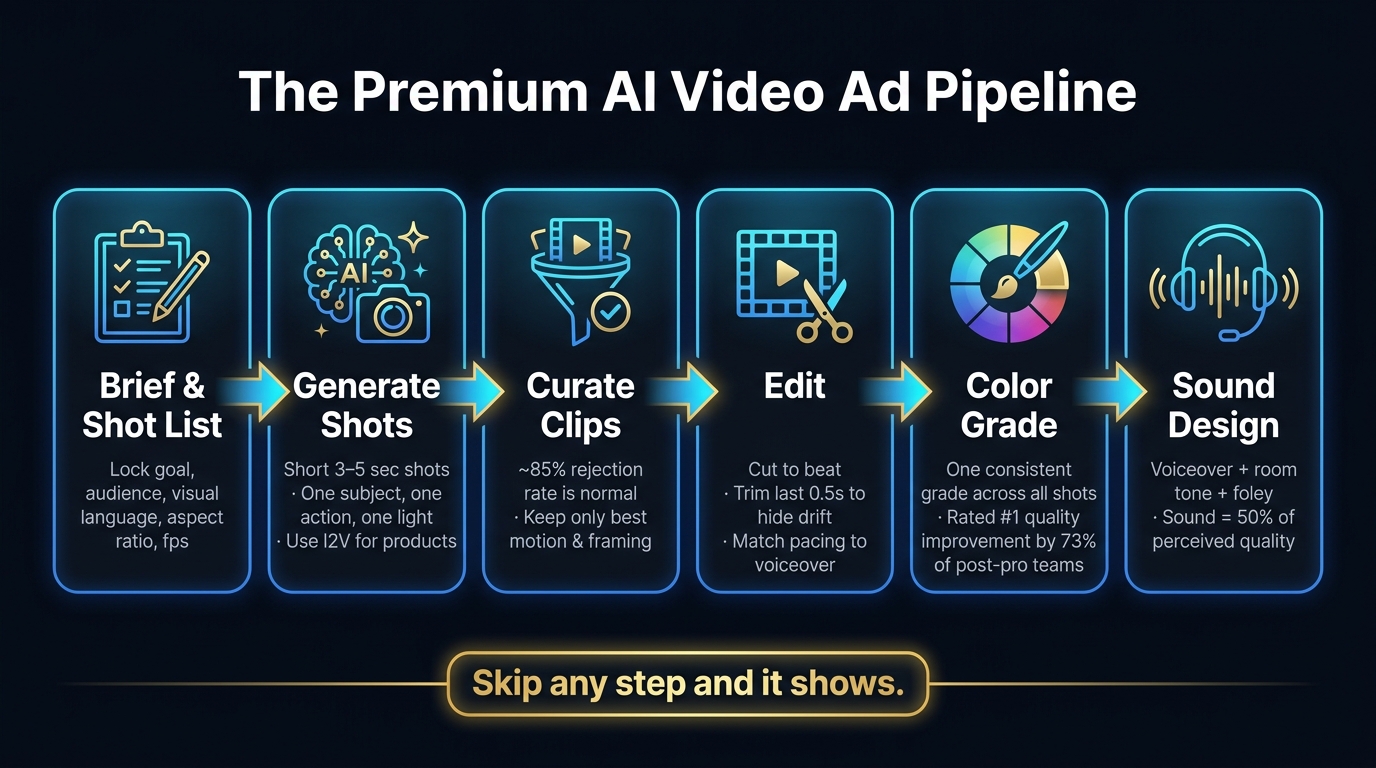
The Premium AI Video Ad Pipeline: From Prompt to Final Ad
From prompt to final ad: prompt -> generate -> edit -> grade -> sound
Once the shots are directed, the next part decides whether the ad looks polished or starts to feel fake. Premium AI video is a workflow, not a single prompt.
A strong AI ad moves from brief and shot list to generation, selection, edit, grade, sound, and final export. Skip even one step and it usually shows. For example, if you jump from raw clips straight to export without a color grade, the final piece can look unfinished. Export in the formats you need - 9:16 and 16:9 - without losing framing.
What to decide before you generate a single shot
Before you generate anything, the brief needs to be locked.
Decide the goal, funnel stage, audience, offer, and visual language first. Then lock the technical settings before generation starts: aspect ratio, color temperature, frame rate, and depth of field. Use 24fps for a cinematic feel and 30fps for a social-native look.
It also helps to separate shots upfront. Use AI where motion is simple, and stay away from dialogue-heavy scenes or complex facial expressions. And don’t rely on text alone. Start with a strong product still. Animating a locked reference frame tends to give you much more consistent results across clips.
Why a human-led finishing process changes the result
Generation gives you raw material. A human editor turns those generated clips into a single ad through curation, shot-to-shot consistency, color matching, and sound.
The biggest part of that job is curation. In pro AI video production, an ~85% clip rejection rate is normal. Most clips get tossed out. That’s not always because the model failed. It’s because only a small slice of outputs have the exact motion, framing, and timing the edit needs.
A good editor also knows when to cut. Ending a clip half a second early - right before the AI’s weak spots become easy to see - is one of the best ways to keep the final ad feeling real. Those pacing calls matter a lot. Someone who gets the ad’s tone, not just the raw message, can turn a pile of clips into a polished brand asset. That’s where AI output becomes a finished ad.
How to get premium AI video without an in-house team
What a premium AI video production workflow should include
A premium workflow covers the whole chain: creative brief, shot list, generation passes, human selection, edit, color grade, sound, and delivery in the formats you need. That part matters more than many brands expect.
For visual consistency, use image-to-video (I2V), not text-to-video. I2V helps keep products and on-screen subjects steady from one cut to the next. It also gives you more control, which is a big deal when you're trying to make an ad look polished instead of patched together.
You also want multiple versions of each shot. Then you pick the takes with the most natural motion. That's where a lot of the quality comes from. The first output usually isn't the one you want to ship.
And don't treat audio like an afterthought. Sound design accounts for roughly 50% of an ad's perceived quality. If the sound feels flat, the whole ad feels cheap, even if the visuals look good.
That is the standard to ask for before you hire anyone.
When a full-service production partner makes more sense than DIY
If you don't have a team to run those steps in-house, the next step is simple: decide who should own the process.
DIY is fine for quick tests and internal mockups. It can help you try ideas fast without spending much. But paid campaigns, product launches, and high-visibility brand ads are a different story. At that point, small mistakes show up fast.
A professional AI commercial typically takes 2–3 weeks from brief to delivery, versus 8–16 weeks for live-action production, and can cut production costs by 60–80%.
That's why many brands hand the work to a full-service partner. You're not just paying for prompts. You're paying for direction, taste, shot choices, editing judgment, color work, and sound.
That leaves the practical questions brands ask before hiring a partner.
Conclusion: premium AI video comes from direction and finishing
Most AI video ads look cheap for two reasons: they're under-directed and under-finished.
The rest comes down to craft: shot direction, selection, editing, color, and sound. Treat AI like a button and you get AI slop. Treat it like a camera, follow the full pipeline, and the result looks like a real ad.
If your brand needs AI video that doesn't look AI-made, Elizaveta Tskhovrebova runs the full pipeline end-to-end - concept, script, direction, generation, editing, color grading, and sound design - so your ads avoid the cheap AI look from the first frame. Get in touch to see what directed, finished AI video looks like for your brand.
FAQs
How much editing does AI video really need?
Usually, quite a bit. AI generation is just one piece of the job. The editing is what turns rough clips into a polished video that people actually want to keep watching.
That often includes color grading across the full timeline, motion fixes, smart cuts before artifacts show up, sound design, and, in some cases, mixing in real footage so the final spot feels more realistic and premium.
When should I use image-to-video instead of text-to-video?
Use image-to-video when visual consistency matters, like keeping a product, character, or setting steady across multiple clips.
Text-to-video can drift from one shot to the next. A clean, well-lit still gives you a reliable visual anchor. That way, the final campaign feels pulled together instead of looking like a stack of random outputs.
Can AI video look premium on a small budget?
Yes. AI video can look premium on a small budget because quality comes more from the workflow than from expensive gear or big crews.
AI helps cut costs like equipment rentals and travel. That gives smaller teams more room to focus on the parts that shape how the final video feels: direction, precise prompting, editing, color grading, sound design, and pacing.
In plain English, the polish usually doesn’t come from just hitting “generate” and calling it done. It comes from the choices made before and after that step. A lean team with a clear plan can often get better-looking results than a bigger team that leans too hard on raw AI output.
Need video like this for your brand?
UGC, commercials, explainers and cinematic — directed with AI, finished like a studio.
Start a project →